AI Invoice Processing: How It Works, Accuracy & ROI
TL;DR: AI invoice processing reads any invoice (PDF, scan, photo, email) with OCR + an LLM, validates the math, PO and supplier bank details, three-way matches it against your PO and goods receipt, and posts it to your ERP, routing only genuine exceptions to a human. Extraction accuracy is high across all tools; the number that matters is touchless rate (60–90% in mature setups). This page explains how the pipeline works. If you are instead comparing vendors to buy, see the 10 best AI invoice processing tools for 2026.
The invoice pile is a solved problem
Supplier invoices arrive as PDFs, scans, photos, and email bodies. Someone keys them into your accounting system, matches them to purchase orders, and chases the ones that don't add up. AI invoice processing software now automates this workflow genuinely, not "demo automatable", production automatable.
This guide covers how the pipeline works, what accuracy you can actually expect, how the approval flow stays under control, and how to choose between building and buying.
The modern pipeline: OCR + LLM, not templates
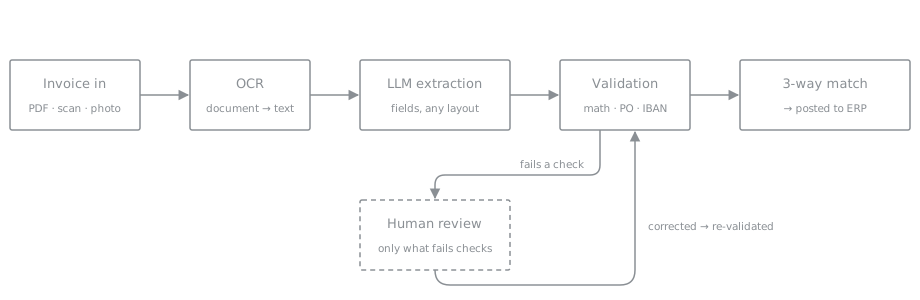
Old invoice software made you define a template per supplier: "the total is always in this corner". It broke every time a supplier changed their layout. The current approach is different:
- OCR turns the document into text, including scanned and photographed invoices.
- An LLM extracts the fields, supplier, invoice number, line items, tax, totals, from that text, regardless of layout. No templates. A new supplier works on day one.
- Validation logic checks the math: do line items sum to the subtotal, does subtotal plus tax equal the total, does the PO number exist, is the supplier's IBAN the one on file?
- Matching pairs the invoice with its purchase order and goods receipt (three-way match) and posts it to your ERP or accounting tool.
Anything that fails validation goes to a human queue with the extracted data pre-filled, the reviewer corrects a field, not the whole document.
AI invoice processing vs OCR vs manual entry
The three ways to get an invoice into your ERP differ less in accuracy than in what breaks them. "AI invoice processing" and "invoice OCR" get used interchangeably, but they are not the same thing, OCR reads characters, AI reads meaning.
| Manual entry | Template OCR | AI (OCR + LLM) | |
|---|---|---|---|
| New supplier | Works, slow | Needs a new template first | Works day one |
| Supplier changes layout | No impact | Breaks silently | No impact |
| Scan / phone photo / fax | Works, slower | Fragile | Handled; routed to review if unsure |
| Messy docs (multi-tax, credit notes, split lines) | Yes, slow | Poorly | Yes |
| Catches its own errors | No, silent typos | No | Yes, confidence flags + arithmetic checks |
| Cost per invoice | €2–5 fully loaded | €0.20–1 + template upkeep | Cents to ~€1 |
| Setup | None | Weeks, per supplier set | Days |
Template OCR was the previous generation: fast on the invoices it was configured for, brittle on everything else. Machine-learning and "intelligent" invoice-processing tools improved the reading step, but the real change is using a language model as the extraction engine, it removes templates entirely and, crucially, can report when it is unsure. Whatever the vendor calls it, AI, machine learning, intelligent capture, IDP, the question that matters is whether the system flags its own mistakes or fails silently.
How invoice OCR works with AI
OCR (optical character recognition) is the first stage, and it has quietly become commodity-grade. Engines like Google Document AI, Azure Document Intelligence, AWS Textract or open-source Tesseract convert a PDF, scan or phone photo into raw text with position data. On a clean digital PDF this step is near-perfect; on a crumpled scan it produces text with errors, which is fine, because OCR is no longer the stage that has to be right.
That's the shift worth understanding: in template-era software, OCR quality decided everything. In an OCR + LLM pipeline, OCR only needs to be good enough for the language model to reconstruct meaning. An LLM reading "T0TAL: 1.842,6O EUR" knows what it's looking at. The burden of correctness moves from character recognition to the validation stage, where it can actually be enforced with arithmetic.
Practical implications when you evaluate invoice OCR:
- Don't benchmark OCR in isolation. Benchmark end-to-end field accuracy on your invoices, 50 real documents tell you more than any vendor demo.
- Photos and faxes belong in the test set. If drivers photograph delivery invoices in your business, that's your real input, not the clean PDF.
- Multi-language matters. Suppliers invoice in their language; the OCR + LLM combination handles mixed-language documents far better than template tools ever did.
Want the OCR stage in more depth? See AI invoice OCR: how it works and how to test it.
LLM invoice data extraction: why it beats templates
The extraction stage hands the OCR text to a language model with a strict output contract: return supplier, invoice number, date, currency, line items, tax breakdown and totals as structured data. Three properties make LLM extraction the step-change over the last generation of tools:
Layout independence. The model reads an invoice the way you do, it finds the total because it understands what a total is, not because a total lives at fixed coordinates. A supplier redesigning their invoice, or a brand-new supplier, costs you nothing.
Messy reality handling. Line items split across pages, discounts expressed as negative lines, three tax rates on one document, a credit note that looks like an invoice, these used to be the 20% of documents that consumed 80% of admin time. An LLM extracts them like anything else, and the validation stage catches the ones it gets wrong.
Self-reported uncertainty. A well-built pipeline asks the model to flag fields it isn't sure about, and treats low confidence as a validation failure. That single design choice is what separates deployable systems from demos: a system that flags its own uncertainty can run unattended, because its errors are visible instead of silent.
What accuracy is realistic
On clean digital PDFs, field-level extraction accuracy in the high 90s is normal. Photographed or faxed invoices are worse, which is exactly why the validation step matters more than the extraction step. A system that flags its own uncertainty is deployable; a system that's confidently wrong 3% of the time is not.
| Input type | Field-level extraction accuracy | Typical handling |
|---|---|---|
| Clean digital PDF | High 90s % | Mostly touchless |
| Scanned invoice | Lower | More review |
| Phone photo / fax | Lowest | Review common |
| Handwritten | Lowest | Almost always review |
The numbers above are directional, not guarantees, the only accuracy figure worth trusting is the one you measure on your own invoices. Track one number: the percentage of invoices that post with zero human touches. A good deployment gets most invoices there within the first months and improves as validation rules absorb your suppliers' quirks.
Automating approvals end to end
Extraction is half the job. The other half, matching, approval routing, duplicate control and payment timing, is the wider accounts payable automation cycle, and it's where most invoice projects quietly stall, because approvals live in someone's inbox.
An end-to-end pipeline encodes the approval policy as rules, not habits:
- Auto-approve invoices that three-way match against a PO and goods receipt within tolerance. There is nothing for a human to decide; a matched invoice is the approval.
- Route by threshold and category, over €10k goes to the department head, new suppliers go to finance, contract services go to the budget owner. The approver gets the invoice, the extracted data and the mismatch highlighted, in Slack or email, with one-tap approve.
- Escalate on silence. An invoice sitting unapproved for three days pings the approver's manager instead of aging into a late-payment fee.
- Log everything. Every extraction, check, approval and correction lands in an audit trail, which is what your auditor actually asks for, and what a shared inbox can never produce.
The touchless rate quoted by the industry for mature deployments, often 60–80% of volume, is mostly a statement about approvals, not extraction: it counts invoices where the whole chain ran without a human, because matching made the approval automatic.
The IBAN check is not optional
Invoice fraud, a lookalike invoice with a changed bank account, is a real and growing loss category. An automated pipeline should hard-stop any invoice where the bank details differ from the supplier record, no matter how confident the extraction is. Automation here reduces fraud risk versus a tired human, because the machine checks every invoice, every time.
Choosing AI invoice processing software
The market splits into four categories. Naming yours is most of the decision (for a tool-by-tool breakdown, see the 10 best AI invoice processing software compared):
| Option | Extraction | Approvals + ERP posting | Per-invoice cost | Best when |
|---|---|---|---|---|
| Invoice-capture SaaS (Rossum, Nanonets, Docsumo) | Strong | You build it | Cents–€1 | You only need capture |
| ERP-native module (SAP, Dynamics, Odoo) | Weak on messy input | Native | Bundled | Clean PDFs, simple approvals |
| Build on n8n + OCR + LLM | Full control | You build it | Lowest | You have someone to operate it |
| Done-for-you pipeline | Full | Included | Project + run | You want it handled end to end |
Dedicated invoice-capture SaaS (Rossum, Nanonets, Docsumo and similar). Strong extraction UIs, per-invoice pricing, quick to try. You still own the other half: approval routing, ERP posting, supplier-record checks and exceptions handling live in your tooling or don't exist.
ERP-native modules (SAP, Dynamics, Odoo, QuickBooks add-ons). Tight posting integration, weakest extraction on messy input, and the approval logic bends to what the module supports rather than how your business actually approves.
Build it yourself on workflow tools like n8n plus an OCR API and an LLM. Full control, lowest per-invoice cost, and the truest fit to your process, if you have someone to build and, more importantly, operate it: models change, suppliers change, edge cases accumulate.
Done-for-you pipeline, a partner builds the extraction, validation, approvals and ERP integration on your infrastructure and operates it. This is what we run for clients at Oido Studio: the n8n-based pipeline above, with agents handling the judgment calls and humans only seeing genuine exceptions.
Quick test for any option: send the vendor (or your own prototype) your 20 ugliest invoices, the phone photos, the handwritten delivery notes, the three-tax-rate credit notes. The demo invoices will always work. Your worst ones are the product.
Not sure which category fits? Book a free consultation and bring a sample of your invoice pile, we'll tell you honestly if a €50/month SaaS tool is all you need.
Benefits and ROI: when it pays off
Rough rule: if invoice handling consumes more than a few hours a week, the automation pays for itself well within a year, sooner if you count early-payment discounts you currently miss because invoices sit in a pile. Against a fully loaded manual cost of €2–5 per invoice, a pipeline processing a few hundred invoices a month recovers its setup cost in the first quarter. Smaller team? The full cost breakdown and payback math at SMB volumes is in AI invoice processing for small business.
One thing that does not remove the need for this pipeline: the wave of EU e-invoicing mandates landing in 2026. They hand you clean structured data on the domestic B2B channel and change nothing about coding, matching or approvals, and everything outside that channel still arrives as a PDF. The same applies to the UK mandate, which lands in April 2029 and leaves B2C, unmandated smaller suppliers and every non-invoice document exactly as they are today.
Invoice intake also tends to be the second automation after order processing: same pattern (messy document in, structured ERP record out), same infrastructure. See what we run for corporate operations, how the invoice processing service works end to end, or the broader AI data entry automation picture. It's also the usual first step in a wider rollout of AI agents for finance teams.
Frequently asked questions
How accurate is AI invoice processing?
On clean digital PDFs, field-level extraction accuracy in the high 90s is normal. Scanned and photographed invoices score lower, which is why production systems validate every extraction, checking totals, PO numbers and bank details, and route only the failures to a human. The metric that matters is touchless rate: the share of invoices posted with zero human input.
Can AI read handwritten or scanned invoices?
Yes. Modern OCR handles scans, photos and faxes; handwriting is the hardest case and lands in the human-review queue more often. The pipeline doesn't break on bad input, it just routes it to a person with the readable fields already pre-filled.
Does AI invoice processing integrate with my ERP or accounting software?
That's the point of the pipeline. Extracted and validated invoices post directly into systems like SAP, Microsoft Dynamics, Odoo, QuickBooks, Xero or a custom ERP via API. If your system has an API or accepts file imports, it can be the last step of the pipeline.
What does AI invoice processing cost?
Per-invoice pricing on SaaS tools typically runs from cents to around a euro depending on volume. A done-for-you pipeline is priced as a project plus operation. The comparison that matters is against the fully loaded cost of manual entry, typically €2–5 per invoice once you count keying, matching, chasing and error correction.
Is it safe to let AI post invoices automatically?
Safer than it sounds, if validation is strict: the machine checks arithmetic, PO match and supplier bank details on every single invoice, which a tired human doesn't. Anything failing a check stops and waits for review. Fraud attempts like changed bank accounts get hard-stopped rather than slipping through.
How long does it take to set up?
A first working pipeline on your real invoices typically takes days, not months, the slow part is wiring validation rules to your supplier list and ERP. Accuracy then improves over the first weeks as the rules absorb your suppliers' quirks.
What is the difference between AI invoice processing and OCR?
OCR reads characters off the page; AI reads meaning. Template OCR needs a layout defined per supplier and breaks when the layout changes. AI invoice processing uses OCR only to get text, then a language model extracts the fields regardless of layout and flags what it is unsure about, so a new supplier works on day one and errors are visible instead of silent.
What is a good touchless rate for invoice automation?
Touchless rate is the share of invoices that post with zero human input. Mature deployments reach 60–80% of volume, but that number is mostly about approvals, not extraction, invoices that three-way match against a PO and goods receipt approve themselves, while genuine exceptions still route to a person.
Can AI invoice processing do three-way matching?
Yes. After extraction and validation, the pipeline pairs each invoice with its purchase order and goods receipt, and auto-approves the ones that match within tolerance. Mismatches route to the right approver with the discrepancy highlighted, which is what turns extraction into genuinely end-to-end automation.